Logo of Boss Rush Network featuring circular icons and text.

How To Set Up Xbox Cloud Gaming and Link Your Game Pass to the Steam Deck

3–5 minutes

So, you finally received your Steam Deck. Next to the convenience of PC gaming on the go with your Steam account, many wondered, How can I link my Game Pass account? There are a few convoluted YouTube videos that I sifted through during the painful hours figuring this out, and my goal to differentiate this How To from the others is to break it down and simplify the process as best I can.

So, is it possible to connect to your Game Pass account on the Steam Deck?

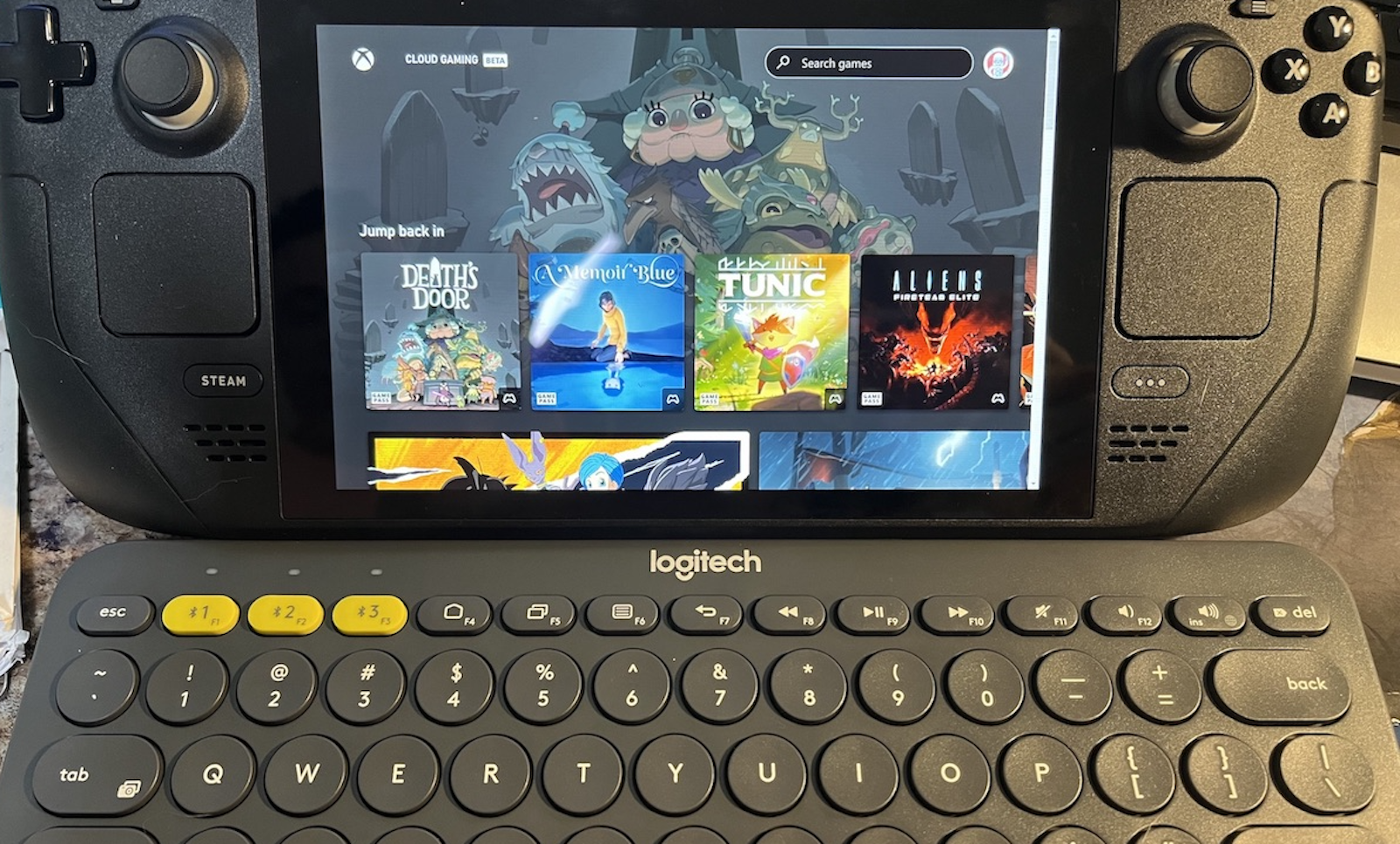
Yes, but it’s through Xbox Cloud Gaming, which needs to be installed manually.

Steps:

  1. Hit the STEAM button on the left lower side of the device and select POWER.
  2. Under the POWER menu, select Switch to Desktop.

3. You will now enter Desktop mode. It’s a little unsettling, and I HIGHLY recommend a bluetooth mouse and keyboard. Technically, you can access the virtual on-screen keyboard by pressing STEAM + X and utilize the tracking pads as the mouse. It is up to user preference.

This is Desktop mode. You will utilize the toolbar at the bottom left.

4. On the taskbar at the bottom left of the screen, click Discover Software Center (Looks like a blue shopping bag, below).

5. Click on APPLICATIONS, then INTERNET, then WEB BROWSERS. You will find Microsoft Edge.

6. Click INSTALL

7. After it has installed, return to the task bar and click on the Application Launcher (looks like the Steam Deck logo, below).

8. Find Microsoft Edge, right click (friendly reminder, this is the LEFT track pad if you are not using a mouse), and select ADD TO STEAM.

NOTE: When I did this, Edge is automatically added to the Non-Steam section of my Library. Some resources state an ADD A GAME window may pop up. If so, scroll to find and check the box for Microsoft Edge and select Add Selected Programs.

9. Return to the Application Launcher. Click on SYSTEM, then KONSOLE.

10. Enter the following and hit ENTER:

flatpak –user override –filesystem=/run/udev:ro com.microsoft.Edge

NOTE: Some sources state that you must enter “Exit” then hit ENTER. After several failures, I simply added the code above and hit ENTER. The important key is confirming that an ERROR message did not pop up.

This is where you enter the command.

11. Exit out of your windows and click on the STEAM icon on the desktop OR return to Steam Mode. Either have worked, and I prefer the latter because it is one less “click”.

12. Get into your LIBRARY  tab and right click on Microsoft Edge.

13. Select Properties.

14. Many resources list this as a step, and I also did the same and recommend it: update the shortcut name to Xbox Cloud Gaming (Beta)

15. Scroll down to LAUNCH OPTIONS. Enter the below AFTER the string of letters/symbols. DO NOT DELETE what is already there:
–window-size=1024,640 –force-device-scale-factor=1.25 –device-scale-factor=1.25 –kiosk “https://www.xbox.com/play”

16. From there, you can RUN/PLAY the program, and if everything was done correctly, you will be brought to your Microsoft Log-in! Presto! You did it!

I hope that at some point in the future, there will be an easier install process. Until then, best wishes, and please feel free to leave a comment if you have any questions or comments. Even better, please share your thoughts with us on our Boss Rush Facebook Group or our Boss Rush Discord.


Stephanie, aka the Madpharmacist, is a pharmacist by day and award-winning author at night! She is a copy editor for the Boss Rush website, co-host of the Boss Rush Podcast, and a regular contributor for After Dark, Standard Definition (Disney), and the EXP Cast. If that isn’t enough, Stephanie also writes for Another Zelda Podcast. She is an avid gamer when she finds the time–with Zelda, Ghost of Tsushima, and indie games as her go-tos.


The Boss Rush Podcast – Fridays at 7AM ET

The Boss Rush Podcast

The Boss Rush Podcast is the flagship podcast of Boss Rush Media and The Boss Rush Network. Each week, Corey, LeRon, Stephanie, Edward, and their friends from around the internet come together to talk their week in games, entertainment, and more while also bringing topics for conversation, answer listener and community questions, and cover major news and events happening in the video game industry. Watch The Boss Rush Podcast live on Wednesday Nights on Twitch at 8:30PM ET / 5:30PM PT or on Friday mornings at 7AM ET on YouTube and podcast services everywhere. Thanks for listening! You can also get this episode one week early on Patreon.

Anchor | Apple Podcasts | Spotify | Google | Twitch | Overcast | Pocket Casts


Supportive reference: Microsoft

We Are Boss Rush. Be Better.

3 responses to “How To Set Up Xbox Cloud Gaming and Link Your Game Pass to the Steam Deck”

  1. […] How To Set Up Xbox Cloud Gaming and Link Your Game Pass to the Steam Deck […]

  2. […] you to enter Desktop Mode, download Microsoft Edge, and enter a string of commands. Check out my article on how to get your Game Pass account onto the Steam […]

  3. DDOCentral Avatar

    Reblogged this on DDOCentral.

Leave a Reply

Nintendo's Position against the Xbox & PlayStation Power Struggle - Boss Rush Podcast - A Podcast about Video Games

Support ⁠⁠⁠⁠⁠⁠⁠⁠⁠⁠⁠⁠⁠⁠⁠⁠⁠⁠⁠Boss Rush Network on Patreon⁠⁠⁠⁠⁠⁠⁠⁠⁠⁠⁠⁠⁠⁠⁠⁠⁠⁠⁠⁠⁠⁠⁠⁠⁠⁠⁠⁠⁠⁠⁠⁠⁠⁠.Nintendo has a way of turning overlooked games into some of the biggest franchises in gaming. On this episode of the Boss Rush Podcast, Corey Dirrig⁠⁠ and Edward Varnell talk about major life changes, preparing for new chapters, and finding ways to keep moving forward. They also dive into how Monolith Soft became one of Nintendo’s most important studios, the role Smash Bros. played in introducing fans to series like Xenoblade and Fire Emblem, and how handheld gaming helped franchises such as Monster Hunter, Persona, Dragon Quest, and other RPGs find huge audiences.This and more on the Boss Rush Podcast, part of the Boss Rush Network. Email us your ⁠⁠⁠⁠⁠⁠⁠⁠⁠⁠⁠⁠⁠⁠⁠⁠questions and topic ideas to the podcast here⁠⁠⁠⁠⁠⁠⁠⁠⁠⁠⁠⁠⁠⁠⁠⁠.Join the ⁠⁠⁠⁠⁠⁠⁠⁠⁠⁠⁠⁠⁠⁠⁠⁠⁠⁠⁠⁠⁠⁠⁠⁠⁠⁠⁠⁠⁠⁠⁠Boss Rush Network Community Discord⁠⁠⁠⁠⁠⁠⁠⁠⁠⁠ here⁠⁠⁠⁠⁠⁠⁠⁠⁠⁠⁠⁠⁠⁠⁠⁠⁠⁠⁠⁠.Follow the Boss Rush Network on ⁠⁠⁠⁠⁠⁠⁠⁠⁠⁠⁠⁠⁠⁠⁠⁠⁠⁠⁠⁠⁠⁠⁠⁠⁠⁠⁠⁠⁠⁠⁠⁠X/Twitter⁠⁠⁠⁠⁠⁠⁠⁠⁠⁠⁠⁠⁠⁠⁠⁠⁠⁠⁠⁠⁠⁠⁠⁠⁠⁠⁠⁠⁠⁠⁠⁠, ⁠⁠⁠⁠⁠⁠⁠⁠⁠⁠⁠⁠⁠⁠⁠⁠⁠⁠⁠⁠⁠⁠⁠⁠⁠⁠⁠⁠⁠⁠⁠⁠Bluesky⁠⁠⁠⁠⁠⁠⁠⁠⁠⁠⁠⁠⁠⁠⁠⁠⁠⁠⁠⁠⁠⁠⁠⁠⁠⁠⁠⁠⁠⁠⁠⁠, ⁠⁠⁠⁠⁠⁠⁠⁠⁠⁠⁠⁠⁠⁠⁠⁠⁠⁠⁠⁠⁠⁠⁠⁠⁠⁠⁠⁠⁠⁠⁠⁠Facebook⁠⁠⁠⁠⁠⁠⁠⁠⁠⁠⁠⁠⁠⁠⁠⁠⁠⁠⁠⁠⁠⁠⁠⁠⁠⁠⁠⁠⁠⁠⁠⁠, ⁠⁠⁠⁠⁠⁠⁠⁠⁠⁠⁠⁠⁠⁠⁠⁠⁠⁠⁠⁠⁠⁠⁠⁠⁠⁠⁠⁠⁠⁠⁠⁠LinkedIn⁠⁠⁠⁠⁠⁠⁠⁠⁠⁠⁠⁠⁠⁠⁠⁠⁠⁠⁠⁠⁠⁠⁠⁠⁠⁠⁠⁠⁠⁠⁠⁠, ⁠⁠⁠⁠⁠⁠⁠⁠⁠⁠⁠⁠⁠⁠⁠⁠⁠⁠⁠⁠⁠⁠⁠⁠⁠⁠⁠⁠⁠⁠⁠⁠Threads⁠⁠⁠⁠⁠⁠⁠⁠⁠⁠⁠⁠⁠⁠⁠⁠⁠⁠⁠⁠⁠⁠⁠⁠⁠⁠⁠⁠⁠⁠⁠⁠, and ⁠⁠⁠⁠⁠⁠⁠⁠⁠⁠⁠⁠⁠⁠⁠⁠⁠⁠⁠⁠⁠⁠⁠⁠⁠⁠⁠⁠⁠⁠⁠⁠Instagram⁠⁠⁠⁠⁠⁠⁠⁠⁠⁠⁠⁠⁠⁠⁠⁠⁠⁠⁠⁠⁠⁠⁠⁠⁠⁠⁠⁠⁠⁠.Thanks for your continued support of the Boss Rush Podcast and the Boss Rush Network! If you listen on podcast services, leave us a 5 star rating and a nice review or comment. If you're listening to this episode on YouTube, subscribe to the channel, like the video, leave a comment, and hit the bell so you don't miss an episode posting. ⁠⁠⁠⁠⁠⁠⁠⁠⁠⁠⁠⁠⁠⁠⁠⁠⁠⁠⁠Visit our website for more great content⁠⁠⁠⁠⁠⁠⁠⁠⁠⁠⁠⁠⁠⁠⁠⁠⁠⁠⁠ from Boss Rush and our community.

Gamescom, D23, Final Fantasy Revelation, Kingdom Hearts IV, & More - Nintendo Pow Block Podcast - Now Your Podcasting with Power!

Hey! Listen! ⁠Email Nintendo Pow Block your questions, topics, and comments⁠! Nintendo is gearing up for a massive fall with new Switch 2 bundles and major game announcements from Gamescom and D23! On this episode of Nintendo Pow Block, ⁠Edward Varnell⁠ and ⁠Corey Dirrig⁠⁠⁠⁠⁠⁠⁠⁠⁠⁠⁠⁠⁠⁠⁠⁠⁠⁠⁠⁠⁠ break down the newly announced $529.99 Switch 2 Sports Resort bundle alongside Nintendo's aggressive sweep taking down over 400 emulator repositories on GitHub. They also dive into exciting game reveals coming to Nintendo's next-gen console, including early looks at Stellar Blade: Complete Edition, Kingdom Hearts IV visiting Pixar's Coco, The Witcher 3 Remastered, and Final Fantasy VII Revelation. Plus, they discuss the Call of Duty: Modern Warfare 4 beta heading to Switch 2 and legendary developer Warren Spector retiring from the industry. This and more on Nintendo Pow Block, part of the Boss Rush Network. Join our Communities:Join the ⁠⁠⁠⁠⁠⁠⁠⁠⁠⁠⁠⁠⁠⁠⁠⁠⁠⁠⁠⁠⁠⁠⁠⁠⁠⁠⁠Boss Rush Network Community Discord⁠⁠⁠⁠⁠⁠⁠⁠⁠⁠⁠⁠⁠⁠⁠⁠⁠⁠⁠⁠⁠⁠⁠⁠⁠⁠. Join the ⁠⁠⁠⁠⁠⁠⁠⁠⁠⁠⁠⁠⁠⁠⁠⁠⁠⁠⁠⁠Boss Rush Network Facebook Group⁠⁠⁠⁠⁠⁠⁠⁠⁠⁠⁠⁠⁠⁠⁠⁠⁠⁠⁠⁠.Follow Nintendo Pow Block on Social Media: Nintendo Pow Block Podcast: ⁠⁠⁠⁠⁠⁠⁠⁠⁠⁠⁠⁠⁠⁠⁠⁠⁠⁠⁠⁠X/Twitter⁠⁠⁠⁠⁠⁠⁠⁠⁠⁠⁠⁠⁠⁠⁠⁠⁠⁠⁠⁠, ⁠⁠⁠⁠⁠⁠⁠⁠⁠⁠⁠⁠⁠⁠⁠⁠⁠⁠⁠⁠Bluesky⁠⁠⁠⁠⁠⁠⁠⁠⁠⁠⁠⁠⁠⁠⁠⁠⁠⁠⁠⁠, ⁠⁠⁠⁠⁠⁠⁠⁠⁠⁠⁠⁠⁠⁠⁠⁠⁠⁠⁠⁠Instagram,⁠⁠⁠⁠⁠⁠⁠⁠⁠⁠⁠⁠⁠⁠⁠⁠⁠⁠⁠⁠ ⁠⁠⁠⁠⁠⁠⁠⁠⁠⁠⁠⁠⁠⁠⁠⁠⁠⁠⁠⁠Threads⁠⁠⁠⁠⁠⁠⁠⁠⁠⁠⁠⁠⁠⁠⁠⁠⁠⁠⁠⁠, ⁠⁠⁠⁠⁠⁠⁠⁠⁠⁠⁠⁠⁠⁠⁠⁠⁠⁠⁠⁠Facebook⁠⁠⁠⁠⁠⁠⁠⁠⁠⁠⁠⁠⁠⁠⁠⁠⁠⁠⁠⁠⁠⁠⁠⁠⁠⁠⁠⁠⁠⁠⁠⁠⁠⁠⁠⁠⁠⁠⁠⁠YouTube⁠⁠⁠⁠⁠⁠⁠⁠⁠⁠⁠⁠⁠⁠⁠⁠⁠⁠⁠⁠, ⁠⁠⁠⁠⁠⁠⁠⁠⁠⁠⁠⁠⁠⁠⁠⁠⁠⁠⁠⁠Twitch.TV⁠⁠⁠⁠⁠⁠⁠⁠⁠⁠⁠⁠⁠⁠⁠⁠⁠⁠⁠⁠Follow the Boss Rush Network: ⁠⁠⁠⁠⁠⁠⁠⁠⁠⁠⁠⁠⁠⁠⁠⁠⁠⁠⁠⁠⁠⁠⁠⁠⁠⁠⁠⁠X/Twitter⁠⁠⁠⁠⁠⁠⁠⁠⁠⁠⁠⁠⁠⁠⁠⁠⁠⁠⁠⁠⁠⁠⁠⁠⁠⁠⁠⁠, ⁠⁠⁠⁠⁠⁠⁠⁠⁠⁠⁠⁠⁠⁠⁠⁠⁠⁠⁠⁠⁠⁠⁠⁠⁠⁠⁠⁠Bluesky⁠⁠⁠⁠⁠⁠⁠⁠⁠⁠⁠⁠⁠⁠⁠⁠⁠⁠⁠⁠⁠⁠⁠⁠⁠⁠⁠⁠, ⁠⁠⁠⁠⁠⁠⁠⁠⁠⁠⁠⁠⁠⁠⁠⁠⁠⁠⁠⁠⁠⁠⁠⁠⁠⁠⁠⁠Instagram⁠⁠⁠⁠⁠⁠⁠⁠⁠⁠⁠⁠⁠⁠⁠⁠⁠⁠⁠⁠⁠⁠⁠⁠⁠⁠⁠, ⁠⁠⁠⁠⁠⁠⁠⁠⁠⁠⁠⁠⁠⁠⁠⁠⁠⁠⁠⁠Threads⁠⁠⁠⁠⁠⁠⁠⁠⁠⁠⁠⁠⁠⁠⁠⁠⁠⁠⁠⁠⁠⁠⁠⁠⁠⁠⁠⁠⁠, ⁠⁠⁠⁠⁠⁠⁠⁠⁠⁠⁠⁠⁠⁠⁠⁠⁠⁠⁠⁠⁠⁠⁠⁠⁠⁠⁠⁠Facebook⁠⁠⁠⁠⁠⁠⁠⁠⁠⁠⁠⁠⁠⁠⁠⁠⁠⁠⁠⁠⁠⁠⁠⁠⁠⁠⁠⁠, ⁠⁠⁠⁠⁠⁠⁠⁠⁠⁠⁠⁠⁠⁠⁠⁠⁠⁠⁠⁠⁠⁠⁠⁠⁠⁠⁠⁠LinkedIn⁠⁠⁠⁠⁠⁠⁠⁠⁠⁠⁠⁠⁠⁠⁠⁠⁠⁠⁠⁠⁠⁠⁠⁠⁠⁠⁠⁠, ⁠⁠⁠⁠⁠⁠⁠⁠⁠⁠⁠⁠⁠⁠⁠⁠⁠⁠⁠⁠⁠⁠⁠⁠⁠⁠⁠⁠⁠⁠⁠⁠⁠⁠⁠⁠⁠⁠⁠⁠⁠⁠⁠⁠⁠⁠⁠⁠⁠⁠⁠⁠⁠⁠⁠⁠⁠⁠⁠⁠⁠⁠⁠⁠YouTube⁠⁠⁠⁠⁠⁠⁠⁠⁠⁠⁠⁠⁠⁠⁠⁠⁠⁠⁠⁠, ⁠⁠⁠⁠⁠⁠⁠⁠⁠⁠⁠⁠⁠⁠⁠⁠⁠⁠⁠⁠Twitch.TV⁠⁠⁠⁠⁠⁠⁠⁠⁠⁠⁠⁠⁠⁠⁠⁠⁠⁠⁠⁠Support Boss Rush Network:Support Boss Rush on ⁠⁠⁠⁠⁠⁠⁠⁠⁠⁠⁠⁠⁠⁠⁠⁠⁠⁠⁠⁠⁠⁠⁠⁠⁠⁠⁠Patreon⁠⁠⁠⁠⁠⁠⁠⁠⁠⁠⁠⁠⁠⁠⁠⁠⁠⁠⁠⁠⁠⁠⁠⁠⁠⁠⁠⁠⁠⁠⁠⁠⁠⁠⁠⁠⁠⁠⁠⁠⁠⁠⁠⁠⁠⁠⁠⁠ and buy merch on our ⁠⁠⁠⁠⁠⁠⁠⁠⁠⁠⁠⁠⁠⁠⁠⁠⁠⁠⁠⁠⁠⁠⁠⁠⁠⁠⁠⁠⁠⁠⁠⁠⁠⁠⁠⁠⁠⁠⁠⁠⁠⁠⁠⁠⁠⁠⁠⁠Store.⁠⁠⁠⁠⁠⁠⁠⁠⁠⁠⁠⁠⁠⁠⁠⁠⁠⁠⁠⁠⁠⁠⁠⁠⁠⁠⁠ Subscribe to ⁠⁠⁠⁠⁠⁠⁠⁠⁠⁠⁠⁠⁠⁠⁠⁠⁠⁠⁠⁠⁠⁠⁠⁠⁠⁠⁠Boss Rush on YouTube⁠⁠⁠⁠⁠⁠⁠⁠⁠⁠⁠⁠⁠⁠⁠⁠⁠⁠⁠⁠⁠⁠⁠⁠⁠⁠⁠ and visit our ⁠⁠⁠⁠⁠⁠⁠⁠⁠⁠⁠⁠⁠⁠⁠⁠⁠⁠⁠⁠⁠⁠⁠⁠⁠⁠⁠website at BossRush.net⁠⁠⁠⁠⁠⁠⁠⁠⁠⁠⁠⁠⁠⁠⁠⁠⁠⁠⁠⁠⁠⁠⁠⁠⁠⁠⁠ for more great content.Thanks for Your Continued Support!Thank you for supporting Nintendo Pow Block! If you’re listening on podcast platforms, leave us a five-star rating and a review. If you’re watching on YouTube, subscribe, like, comment, and hit the bell so you never miss an episode. Your support means the world—see you next time on Nintendo Pow Block!

Xbox Disc-to-Digital Games? Xbox’s Big Push for Game Preservation - Xbox Casuals: An Xbox Podcast

Support Boss Rush on Patreon here.What happens when your physical Xbox games can unlock the flexibility of digital ownership? This week on Xbox Casuals, Corey Dirrig and Josh Finney discuss Xbox’s continued support and approach to game ownership, including the recently announced disc-to-digital program for supported physical game discs providing digital access and benefits. They talk about why game preservation is more than nostalgia, why players want confidence that their libraries will survive future hardware changes, and how Xbox could build stronger loyalty by respecting past purchases. Corey and Josh also discuss the frustration gamers feel when companies and content creators rely on vague updates instead of clear, useful information. Plus, they look at Gamescom, community expectations, and why meaningful player engagement matters more than flashy marketing.This and more on Xbox Casuals: An Xbox Podcast, part of the Boss Rush Network. Join the ⁠⁠⁠⁠⁠⁠⁠⁠⁠⁠⁠⁠⁠⁠⁠⁠⁠⁠⁠⁠⁠⁠⁠⁠⁠⁠⁠⁠⁠⁠⁠⁠Boss Rush Network Community Discord⁠⁠⁠⁠⁠⁠⁠⁠⁠⁠ here⁠⁠⁠⁠⁠⁠⁠⁠⁠⁠⁠⁠⁠⁠⁠⁠⁠⁠⁠⁠⁠.Follow the Boss Rush Network on ⁠⁠⁠⁠⁠⁠⁠⁠⁠⁠⁠⁠⁠⁠⁠⁠⁠⁠⁠⁠⁠⁠⁠⁠⁠⁠⁠⁠⁠⁠⁠⁠⁠X/Twitter⁠⁠⁠⁠⁠⁠⁠⁠⁠⁠⁠⁠⁠⁠⁠⁠⁠⁠⁠⁠⁠⁠⁠⁠⁠⁠⁠⁠⁠⁠⁠⁠⁠, ⁠⁠⁠⁠⁠⁠⁠⁠⁠⁠⁠⁠⁠⁠⁠⁠⁠⁠⁠⁠⁠⁠⁠⁠⁠⁠⁠⁠⁠⁠⁠⁠⁠Bluesky⁠⁠⁠⁠⁠⁠⁠⁠⁠⁠⁠⁠⁠⁠⁠⁠⁠⁠⁠⁠⁠⁠⁠⁠⁠⁠⁠⁠⁠⁠⁠⁠⁠, ⁠⁠⁠⁠⁠⁠⁠⁠⁠⁠⁠⁠⁠⁠⁠⁠⁠⁠⁠⁠⁠⁠⁠⁠⁠⁠⁠⁠⁠⁠⁠⁠⁠Facebook⁠⁠⁠⁠⁠⁠⁠⁠⁠⁠⁠⁠⁠⁠⁠⁠⁠⁠⁠⁠⁠⁠⁠⁠⁠⁠⁠⁠⁠⁠⁠⁠⁠, ⁠⁠⁠⁠⁠⁠⁠⁠⁠⁠⁠⁠⁠⁠⁠⁠⁠⁠⁠⁠⁠⁠⁠⁠⁠⁠⁠⁠⁠⁠⁠⁠⁠LinkedIn⁠⁠⁠⁠⁠⁠⁠⁠⁠⁠⁠⁠⁠⁠⁠⁠⁠⁠⁠⁠⁠⁠⁠⁠⁠⁠⁠⁠⁠⁠⁠⁠⁠, ⁠⁠⁠⁠⁠⁠⁠⁠⁠⁠⁠⁠⁠⁠⁠⁠⁠⁠⁠⁠⁠⁠⁠⁠⁠⁠⁠⁠⁠⁠⁠⁠⁠Threads⁠⁠⁠⁠⁠⁠⁠⁠⁠⁠⁠⁠⁠⁠⁠⁠⁠⁠⁠⁠⁠⁠⁠⁠⁠⁠⁠⁠⁠⁠⁠⁠⁠, and ⁠⁠⁠⁠⁠⁠⁠⁠⁠⁠⁠⁠⁠⁠⁠⁠⁠⁠⁠⁠⁠⁠⁠⁠⁠⁠⁠⁠⁠⁠⁠⁠⁠Instagram⁠⁠⁠⁠⁠⁠⁠⁠⁠⁠⁠⁠⁠⁠⁠⁠⁠⁠⁠⁠⁠⁠⁠⁠⁠⁠⁠⁠⁠⁠⁠.Thank you for your continued support of Xbox Casuals and the Boss Rush Network. If you're listening on podcast services, leave us a five star rating and a review or a comment. If you're watching this video on YouTube, subscribe to the channel, like the video, leave a comment, and hit the bell so you don't miss an episode posting. Your continued listenership and viewership means a lot to us. See you next time on Xbox Casuals!

Physical Games, Steam Machines, & Black Flag Returns - Boss Rush Gamescast - A Gameplay Discussion Podcast

Is physical game collecting making a comeback, or is it becoming a thing of the past? This week on the Boss Rush Gamescast, Stoy Jovic, Sofi Beyen, and Stephanie Klimov discuss everything from the end of the World Cup to the games they've been playing, including Assassin's Creed IV: Black Flag Resynced, Final Fantasy Tactics, Palworld, and Mouse P.I. for Hire. They also share their latest gaming pickups, including the new Steam Machine, retro PlayStation 2 classics, and a Polymega Remix, before diving into the future of physical media, retro game preservation, streaming, and the creators who inspire them.

Discover more from Boss Rush Network

Subscribe now to keep reading and get access to the full archive.

Continue reading