Logo of Boss Rush Network featuring circular icons and text.

How to Upgrade Your Nintendo Switch’s Memory Card

4–6 minutes

The march to digital gaming grows faster each day as gamers are ditching physical copies in lieu of digital versions.

This shift brings many benefits, but it also presents unique challenges. If you have a Nintendo Switch, you get either 32 or 64 gigabytes of internal memory for the standard and OLED versions, respectively, of the console. 

Many are expanding their systems’ storage space via memory cards, but what happens when you fill up that storage? Fortunately, upgrading to a larger memory card is a simple process that can get you back to building your digital library in no time.

The first step to upgrading your memory is to find the right memory card.

Selecting the Right Fit for a Memory Card

While it might seem obvious to just go and buy a memory card for your Switch, there are a few considerations you need to take into account:

  • The Nintendo Switch supports three types of memory cards: microSD (up to 2 GB), microSDHC (4-32 GB), and micro SDXC (32 GB and up).
  • Your new memory card should have high speed capabilities including UHS-1 (Ultra High Speed Phase 1) compatibility. There is no benefit of going any higher than this phase due to hardware limitations on the Switch.
  • Your new memory card should also have transfer speeds of 60-95 megabytes per second. The higher you go, the better gameplay experience you will have.
  • There isn’t any benefit from going too much past 95 MB/S as the Switch has a transfer speed cap. 
  • A Class 10 (labelled C10 on the card) speed for a memory card will prevent lag or slow down on your Switch. 
Nintendo has officially-licensed memory cards that are compatible with your Switch. (Image Credit: Nintendo Life)
  • SanDisk is a popular brand and there’s often a question between buying the Ultra or Extreme cards. Extreme has faster transfer speeds, many of which extend past the Switch’s limitations, and are more expensive. Ultra provides slower speeds but is cheaper.
  • Popular storage limits include 128 GB, 256 GB, 512 GB, and 1 Terabyte. Keep in mind many AAA games will be larger files while indie games and ports tend to have smaller file sizes.
  • For those upgrading, consider having a micro SD to SD card adapter depending on your computer.

There are plenty of websites that can help you further decide which option is the best, including recommendations.

Image Credit: Nintendo

Replacing Your Old Memory Card for a New One

Once you’ve selected a new memory card, the next step is to transfer the data from your old card to your new one. Here’s how to do it:

  • Power down your Nintendo Switch completely. Hold the power button for three seconds to bring up the menu. Select “Power Options” and then “Turn Off” to shut down the system completely.
  • Remove your memory card.
Image Credit: Nintendo (Via How To Geek)
  • Insert your old memory card into your computer. You may need a micro SD to SD adapter to insert your card into your computer. 
  • Access the card’s content and copy it all onto your computer. Depending on the size of your card, this may take several hours.
When you open your Switch’s old memory card on your computer, these are the folders that will appear. These will need to be copied to your computer. (Image Credit: iMore)
  • Format your new memory card. You can do this via the following steps:
    • Insert your new memory card into your Switch.
    • Select “System Settings” on the bottom of the home menu.
    • Scroll to “System” on the left side and select it.
    • Scroll to “Formatting Options” on the right side and select it.
    • The following message will pop up “All data on the microSD will be deleted. Data cannot be restored once it’s deleted. Continue?” Select continue.
    • Select “Format” for the console will restart and your new card will be formatted.
    • Completely power down your Switch and remove your formatted card.
  • Once the files from your old memory card are copied to your computer, remove the old memory card.
  • Insert your new memory card into the computer.
  • Copy your files onto your new memory card. This may take several hours depending on your file size.
  • Once finished, remove the new memory card and insert it back into your Switch. Nintendo notes that any files that do not transfer properly can be redownloaded from the e-shop.
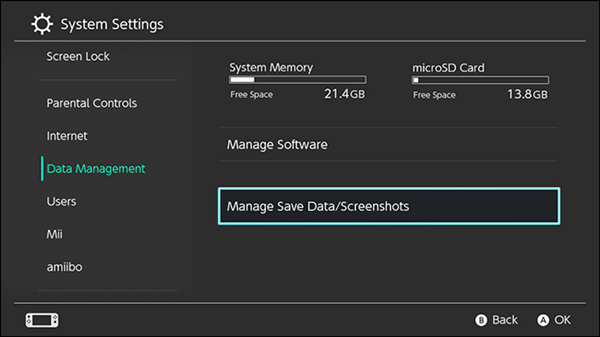
Use the System Settings menu to manage and view your memory card’s storage. (Image Credit: Support.com)

If you want to double check your files, go to “System Settings” on the home menu > “Data Management” > “Manage Software.” This will show you what files are on your system memory and what’s on the memory.

With that, you are ready to continue buoying your digital library and further enjoy your Nintendo Switch.


Nintendo Pow Block Podcast – Wednesdays at 7 a.m. ET

Nintendo Pow Block

Nintendo Pow Block is Boss Rush Media and The Boss Rush Network’s Nintendo podcast. Each week, Edward, Corey, and their friends from around the internet come together to talk about the week in Nintendo, including news, rumors, new games, questions, and the fan-favorite Snacktendo segment. Check out Nintendo Pow Block Live on Twitch every Monday night at 8:30 p.m. Eastern / 5:30 p.m. Pacific or on Podcast Services and YouTube Wednesday mornings at 7 a.m. If you enjoy the show, consider leaving us a five star rating on iTunes and Spotify. Thanks for listening to Nintendo Pow Block!

Anchor Apple Podcasts | Spotify | Google | Overcast | Pocket Casts


Sources: Nintendo

Featured Image: Nintendo Life

We Are Boss Rush. Be Better.

, ,
, ,

One response to “How to Upgrade Your Nintendo Switch’s Memory Card”

  1. […] Upgrading the Nintendo Switch Memory Card […]

Leave a Reply

Grand Theft Auto VI Netflix Reactions, Xbox Disc-to-Digital, & More - Boss Rush Podcast - A Podcast about Video Games

Support ⁠⁠⁠⁠⁠⁠⁠⁠⁠⁠⁠⁠⁠⁠⁠⁠⁠⁠⁠⁠Boss Rush Network on Patreon⁠⁠⁠⁠⁠⁠⁠⁠⁠⁠⁠⁠⁠⁠⁠⁠⁠⁠⁠⁠⁠⁠⁠⁠⁠⁠⁠⁠⁠⁠⁠⁠⁠⁠⁠⁠.Is Xbox finally finding the right balance between physical game ownership and a digital future? On this episode of the Boss Rush Podcast, ⁠Corey Dirrig⁠ and ⁠LeRon Dawkins discuss Xbox’s new disc-to-digital program, which lets players claim digital licenses for compatible physical games, along with the latest GTA 6 gameplay details and its November 2026 release date. They also break down the biggest Gamescom announcements, including The Witcher 3, Alien: Isolation 2, Fable, Tomb Raider, and Silent Hill Townfall, before diving into Xbox’s Project Helix and its plans for a family of next-generation gaming devices.This and more on the Boss Rush Podcast, part of the Boss Rush Network. Email us your ⁠⁠⁠⁠⁠⁠⁠⁠⁠⁠⁠⁠⁠⁠⁠⁠⁠questions and topic ideas to the podcast here⁠⁠⁠⁠⁠⁠⁠⁠⁠⁠⁠⁠⁠⁠⁠⁠⁠.Join the ⁠⁠⁠⁠⁠⁠⁠⁠⁠⁠⁠⁠⁠⁠⁠⁠⁠⁠⁠⁠⁠⁠⁠⁠⁠⁠⁠⁠⁠⁠⁠⁠Boss Rush Network Community Discord⁠⁠⁠⁠⁠⁠⁠⁠⁠⁠ here⁠⁠⁠⁠⁠⁠⁠⁠⁠⁠⁠⁠⁠⁠⁠⁠⁠⁠⁠⁠⁠.Follow the Boss Rush Network on ⁠⁠⁠⁠⁠⁠⁠⁠⁠⁠⁠⁠⁠⁠⁠⁠⁠⁠⁠⁠⁠⁠⁠⁠⁠⁠⁠⁠⁠⁠⁠⁠⁠X/Twitter⁠⁠⁠⁠⁠⁠⁠⁠⁠⁠⁠⁠⁠⁠⁠⁠⁠⁠⁠⁠⁠⁠⁠⁠⁠⁠⁠⁠⁠⁠⁠⁠⁠, ⁠⁠⁠⁠⁠⁠⁠⁠⁠⁠⁠⁠⁠⁠⁠⁠⁠⁠⁠⁠⁠⁠⁠⁠⁠⁠⁠⁠⁠⁠⁠⁠⁠Bluesky⁠⁠⁠⁠⁠⁠⁠⁠⁠⁠⁠⁠⁠⁠⁠⁠⁠⁠⁠⁠⁠⁠⁠⁠⁠⁠⁠⁠⁠⁠⁠⁠⁠, ⁠⁠⁠⁠⁠⁠⁠⁠⁠⁠⁠⁠⁠⁠⁠⁠⁠⁠⁠⁠⁠⁠⁠⁠⁠⁠⁠⁠⁠⁠⁠⁠⁠Facebook⁠⁠⁠⁠⁠⁠⁠⁠⁠⁠⁠⁠⁠⁠⁠⁠⁠⁠⁠⁠⁠⁠⁠⁠⁠⁠⁠⁠⁠⁠⁠⁠⁠, ⁠⁠⁠⁠⁠⁠⁠⁠⁠⁠⁠⁠⁠⁠⁠⁠⁠⁠⁠⁠⁠⁠⁠⁠⁠⁠⁠⁠⁠⁠⁠⁠⁠LinkedIn⁠⁠⁠⁠⁠⁠⁠⁠⁠⁠⁠⁠⁠⁠⁠⁠⁠⁠⁠⁠⁠⁠⁠⁠⁠⁠⁠⁠⁠⁠⁠⁠⁠, ⁠⁠⁠⁠⁠⁠⁠⁠⁠⁠⁠⁠⁠⁠⁠⁠⁠⁠⁠⁠⁠⁠⁠⁠⁠⁠⁠⁠⁠⁠⁠⁠⁠Threads⁠⁠⁠⁠⁠⁠⁠⁠⁠⁠⁠⁠⁠⁠⁠⁠⁠⁠⁠⁠⁠⁠⁠⁠⁠⁠⁠⁠⁠⁠⁠⁠⁠, and ⁠⁠⁠⁠⁠⁠⁠⁠⁠⁠⁠⁠⁠⁠⁠⁠⁠⁠⁠⁠⁠⁠⁠⁠⁠⁠⁠⁠⁠⁠⁠⁠⁠Instagram⁠⁠⁠⁠⁠⁠⁠⁠⁠⁠⁠⁠⁠⁠⁠⁠⁠⁠⁠⁠⁠⁠⁠⁠⁠⁠⁠⁠⁠⁠⁠.Thanks for your continued support of the Boss Rush Podcast and the Boss Rush Network! If you listen on podcast services, leave us a 5 star rating and a nice review or comment. If you're listening to this episode on YouTube, subscribe to the channel, like the video, leave a comment, and hit the bell so you don't miss an episode posting. ⁠⁠⁠⁠⁠⁠⁠⁠⁠⁠⁠⁠⁠⁠⁠⁠⁠⁠⁠⁠Visit our website for more great content⁠⁠⁠⁠⁠⁠⁠⁠⁠⁠⁠⁠⁠⁠⁠⁠⁠⁠⁠⁠ from Boss Rush and our community.
Hey! Listen! ⁠⁠Email Nintendo Pow Block your questions, topics, and comments⁠⁠! The Boss Rush crew is officially heading to Seattle for PAX West 2026, and the excitement is off the charts! This week on Nintendo Pow Block, Edward Varnell⁠⁠ and ⁠⁠Corey Dirrig sit down right before flying out to catch up on final convention preparations, media kits, and meeting up with the rest of the team. Alongside their pre-event travel chaos, they dive into a deep discussion on how artificial intelligence is changing video game development. Rather than replacing human creators entirely, smart AI tools like procedural generation and performance upscaling are streamlining production pipelines. Tune in for an insider preview of what to expect from PAX West and a fresh take on modern gaming technology!This and more on Nintendo Pow Block, part of the Boss Rush Network.Join our Communities:Join the ⁠⁠⁠⁠⁠⁠⁠⁠⁠⁠⁠⁠⁠⁠⁠⁠⁠⁠⁠⁠⁠⁠⁠⁠⁠⁠⁠⁠Boss Rush Network Community Discord⁠⁠⁠⁠⁠⁠⁠⁠⁠⁠⁠⁠⁠⁠⁠⁠⁠⁠⁠⁠⁠⁠⁠⁠⁠⁠⁠. Join the ⁠⁠⁠⁠⁠⁠⁠⁠⁠⁠⁠⁠⁠⁠⁠⁠⁠⁠⁠⁠⁠Boss Rush Network Facebook Group⁠⁠⁠⁠⁠⁠⁠⁠⁠⁠⁠⁠⁠⁠⁠⁠⁠⁠⁠⁠⁠.Follow Nintendo Pow Block on Social Media: Nintendo Pow Block Podcast: ⁠⁠⁠⁠⁠⁠⁠⁠⁠⁠⁠⁠⁠⁠⁠⁠⁠⁠⁠⁠⁠X/Twitter⁠⁠⁠⁠⁠⁠⁠⁠⁠⁠⁠⁠⁠⁠⁠⁠⁠⁠⁠⁠⁠, ⁠⁠⁠⁠⁠⁠⁠⁠⁠⁠⁠⁠⁠⁠⁠⁠⁠⁠⁠⁠⁠Bluesky⁠⁠⁠⁠⁠⁠⁠⁠⁠⁠⁠⁠⁠⁠⁠⁠⁠⁠⁠⁠⁠, ⁠⁠⁠⁠⁠⁠⁠⁠⁠⁠⁠⁠⁠⁠⁠⁠⁠⁠⁠⁠⁠Instagram,⁠⁠⁠⁠⁠⁠⁠⁠⁠⁠⁠⁠⁠⁠⁠⁠⁠⁠⁠⁠⁠ ⁠⁠⁠⁠⁠⁠⁠⁠⁠⁠⁠⁠⁠⁠⁠⁠⁠⁠⁠⁠⁠Threads⁠⁠⁠⁠⁠⁠⁠⁠⁠⁠⁠⁠⁠⁠⁠⁠⁠⁠⁠⁠⁠, ⁠⁠⁠⁠⁠⁠⁠⁠⁠⁠⁠⁠⁠⁠⁠⁠⁠⁠⁠⁠⁠Facebook⁠⁠⁠⁠⁠⁠⁠⁠⁠⁠⁠⁠⁠⁠⁠⁠⁠⁠⁠⁠⁠⁠⁠⁠⁠⁠⁠⁠⁠⁠⁠⁠⁠⁠⁠⁠⁠⁠⁠⁠⁠⁠YouTube⁠⁠⁠⁠⁠⁠⁠⁠⁠⁠⁠⁠⁠⁠⁠⁠⁠⁠⁠⁠⁠, ⁠⁠⁠⁠⁠⁠⁠⁠⁠⁠⁠⁠⁠⁠⁠⁠⁠⁠⁠⁠⁠Twitch.TV⁠⁠⁠⁠⁠⁠⁠⁠⁠⁠⁠⁠⁠⁠⁠⁠⁠⁠⁠⁠⁠Follow the Boss Rush Network: ⁠⁠⁠⁠⁠⁠⁠⁠⁠⁠⁠⁠⁠⁠⁠⁠⁠⁠⁠⁠⁠⁠⁠⁠⁠⁠⁠⁠⁠X/Twitter⁠⁠⁠⁠⁠⁠⁠⁠⁠⁠⁠⁠⁠⁠⁠⁠⁠⁠⁠⁠⁠⁠⁠⁠⁠⁠⁠⁠⁠, ⁠⁠⁠⁠⁠⁠⁠⁠⁠⁠⁠⁠⁠⁠⁠⁠⁠⁠⁠⁠⁠⁠⁠⁠⁠⁠⁠⁠⁠Bluesky⁠⁠⁠⁠⁠⁠⁠⁠⁠⁠⁠⁠⁠⁠⁠⁠⁠⁠⁠⁠⁠⁠⁠⁠⁠⁠⁠⁠⁠, ⁠⁠⁠⁠⁠⁠⁠⁠⁠⁠⁠⁠⁠⁠⁠⁠⁠⁠⁠⁠⁠⁠⁠⁠⁠⁠⁠⁠⁠Instagram⁠⁠⁠⁠⁠⁠⁠⁠⁠⁠⁠⁠⁠⁠⁠⁠⁠⁠⁠⁠⁠⁠⁠⁠⁠⁠⁠⁠, ⁠⁠⁠⁠⁠⁠⁠⁠⁠⁠⁠⁠⁠⁠⁠⁠⁠⁠⁠⁠⁠Threads⁠⁠⁠⁠⁠⁠⁠⁠⁠⁠⁠⁠⁠⁠⁠⁠⁠⁠⁠⁠⁠⁠⁠⁠⁠⁠⁠⁠⁠⁠, ⁠⁠⁠⁠⁠⁠⁠⁠⁠⁠⁠⁠⁠⁠⁠⁠⁠⁠⁠⁠⁠⁠⁠⁠⁠⁠⁠⁠⁠Facebook⁠⁠⁠⁠⁠⁠⁠⁠⁠⁠⁠⁠⁠⁠⁠⁠⁠⁠⁠⁠⁠⁠⁠⁠⁠⁠⁠⁠⁠, ⁠⁠⁠⁠⁠⁠⁠⁠⁠⁠⁠⁠⁠⁠⁠⁠⁠⁠⁠⁠⁠⁠⁠⁠⁠⁠⁠⁠⁠LinkedIn⁠⁠⁠⁠⁠⁠⁠⁠⁠⁠⁠⁠⁠⁠⁠⁠⁠⁠⁠⁠⁠⁠⁠⁠⁠⁠⁠⁠⁠, ⁠⁠⁠⁠⁠⁠⁠⁠⁠⁠⁠⁠⁠⁠⁠⁠⁠⁠⁠⁠⁠⁠⁠⁠⁠⁠⁠⁠⁠⁠⁠⁠⁠⁠⁠⁠⁠⁠⁠⁠⁠⁠⁠⁠⁠⁠⁠⁠⁠⁠⁠⁠⁠⁠⁠⁠⁠⁠⁠⁠⁠⁠⁠⁠⁠⁠⁠YouTube⁠⁠⁠⁠⁠⁠⁠⁠⁠⁠⁠⁠⁠⁠⁠⁠⁠⁠⁠⁠⁠, ⁠⁠⁠⁠⁠⁠⁠⁠⁠⁠⁠⁠⁠⁠⁠⁠⁠⁠⁠⁠⁠Twitch.TV⁠⁠⁠⁠⁠⁠⁠⁠⁠⁠⁠⁠⁠⁠⁠⁠⁠⁠⁠⁠⁠Support Boss Rush Network:Support Boss Rush on ⁠⁠⁠⁠⁠⁠⁠⁠⁠⁠⁠⁠⁠⁠⁠⁠⁠⁠⁠⁠⁠⁠⁠⁠⁠⁠⁠⁠Patreon⁠⁠⁠⁠⁠⁠⁠⁠⁠⁠⁠⁠⁠⁠⁠⁠⁠⁠⁠⁠⁠⁠⁠⁠⁠⁠⁠⁠⁠⁠⁠⁠⁠⁠⁠⁠⁠⁠⁠⁠⁠⁠⁠⁠⁠⁠⁠⁠⁠ and buy merch on our ⁠⁠⁠⁠⁠⁠⁠⁠⁠⁠⁠⁠⁠⁠⁠⁠⁠⁠⁠⁠⁠⁠⁠⁠⁠⁠⁠⁠⁠⁠⁠⁠⁠⁠⁠⁠⁠⁠⁠⁠⁠⁠⁠⁠⁠⁠⁠⁠⁠Store.⁠⁠⁠⁠⁠⁠⁠⁠⁠⁠⁠⁠⁠⁠⁠⁠⁠⁠⁠⁠⁠⁠⁠⁠⁠⁠⁠⁠ Subscribe to ⁠⁠⁠⁠⁠⁠⁠⁠⁠⁠⁠⁠⁠⁠⁠⁠⁠⁠⁠⁠⁠⁠⁠⁠⁠⁠⁠⁠Boss Rush on YouTube⁠⁠⁠⁠⁠⁠⁠⁠⁠⁠⁠⁠⁠⁠⁠⁠⁠⁠⁠⁠⁠⁠⁠⁠⁠⁠⁠⁠ and visit our ⁠⁠⁠⁠⁠⁠⁠⁠⁠⁠⁠⁠⁠⁠⁠⁠⁠⁠⁠⁠⁠⁠⁠⁠⁠⁠⁠⁠website at BossRush.net⁠⁠⁠⁠⁠⁠⁠⁠⁠⁠⁠⁠⁠⁠⁠⁠⁠⁠⁠⁠⁠⁠⁠⁠⁠⁠⁠⁠ for more great content.Thanks for Your Continued Support!Thank you for supporting Nintendo Pow Block! If you’re listening on podcast platforms, leave us a five-star rating and a review. If you’re watching on YouTube, subscribe, like, comment, and hit the bell so you never miss an episode. Your support means the world—see you next time on Nintendo Pow Block!

Xbox Disc-to-Digital Games? Xbox’s Big Push for Game Preservation - Xbox Casuals: An Xbox Podcast

Support Boss Rush on Patreon here.What happens when your physical Xbox games can unlock the flexibility of digital ownership? This week on Xbox Casuals, Corey Dirrig and Josh Finney discuss Xbox’s continued support and approach to game ownership, including the recently announced disc-to-digital program for supported physical game discs providing digital access and benefits. They talk about why game preservation is more than nostalgia, why players want confidence that their libraries will survive future hardware changes, and how Xbox could build stronger loyalty by respecting past purchases. Corey and Josh also discuss the frustration gamers feel when companies and content creators rely on vague updates instead of clear, useful information. Plus, they look at Gamescom, community expectations, and why meaningful player engagement matters more than flashy marketing.This and more on Xbox Casuals: An Xbox Podcast, part of the Boss Rush Network. Join the ⁠⁠⁠⁠⁠⁠⁠⁠⁠⁠⁠⁠⁠⁠⁠⁠⁠⁠⁠⁠⁠⁠⁠⁠⁠⁠⁠⁠⁠⁠⁠⁠Boss Rush Network Community Discord⁠⁠⁠⁠⁠⁠⁠⁠⁠⁠ here⁠⁠⁠⁠⁠⁠⁠⁠⁠⁠⁠⁠⁠⁠⁠⁠⁠⁠⁠⁠⁠.Follow the Boss Rush Network on ⁠⁠⁠⁠⁠⁠⁠⁠⁠⁠⁠⁠⁠⁠⁠⁠⁠⁠⁠⁠⁠⁠⁠⁠⁠⁠⁠⁠⁠⁠⁠⁠⁠X/Twitter⁠⁠⁠⁠⁠⁠⁠⁠⁠⁠⁠⁠⁠⁠⁠⁠⁠⁠⁠⁠⁠⁠⁠⁠⁠⁠⁠⁠⁠⁠⁠⁠⁠, ⁠⁠⁠⁠⁠⁠⁠⁠⁠⁠⁠⁠⁠⁠⁠⁠⁠⁠⁠⁠⁠⁠⁠⁠⁠⁠⁠⁠⁠⁠⁠⁠⁠Bluesky⁠⁠⁠⁠⁠⁠⁠⁠⁠⁠⁠⁠⁠⁠⁠⁠⁠⁠⁠⁠⁠⁠⁠⁠⁠⁠⁠⁠⁠⁠⁠⁠⁠, ⁠⁠⁠⁠⁠⁠⁠⁠⁠⁠⁠⁠⁠⁠⁠⁠⁠⁠⁠⁠⁠⁠⁠⁠⁠⁠⁠⁠⁠⁠⁠⁠⁠Facebook⁠⁠⁠⁠⁠⁠⁠⁠⁠⁠⁠⁠⁠⁠⁠⁠⁠⁠⁠⁠⁠⁠⁠⁠⁠⁠⁠⁠⁠⁠⁠⁠⁠, ⁠⁠⁠⁠⁠⁠⁠⁠⁠⁠⁠⁠⁠⁠⁠⁠⁠⁠⁠⁠⁠⁠⁠⁠⁠⁠⁠⁠⁠⁠⁠⁠⁠LinkedIn⁠⁠⁠⁠⁠⁠⁠⁠⁠⁠⁠⁠⁠⁠⁠⁠⁠⁠⁠⁠⁠⁠⁠⁠⁠⁠⁠⁠⁠⁠⁠⁠⁠, ⁠⁠⁠⁠⁠⁠⁠⁠⁠⁠⁠⁠⁠⁠⁠⁠⁠⁠⁠⁠⁠⁠⁠⁠⁠⁠⁠⁠⁠⁠⁠⁠⁠Threads⁠⁠⁠⁠⁠⁠⁠⁠⁠⁠⁠⁠⁠⁠⁠⁠⁠⁠⁠⁠⁠⁠⁠⁠⁠⁠⁠⁠⁠⁠⁠⁠⁠, and ⁠⁠⁠⁠⁠⁠⁠⁠⁠⁠⁠⁠⁠⁠⁠⁠⁠⁠⁠⁠⁠⁠⁠⁠⁠⁠⁠⁠⁠⁠⁠⁠⁠Instagram⁠⁠⁠⁠⁠⁠⁠⁠⁠⁠⁠⁠⁠⁠⁠⁠⁠⁠⁠⁠⁠⁠⁠⁠⁠⁠⁠⁠⁠⁠⁠.Thank you for your continued support of Xbox Casuals and the Boss Rush Network. If you're listening on podcast services, leave us a five star rating and a review or a comment. If you're watching this video on YouTube, subscribe to the channel, like the video, leave a comment, and hit the bell so you don't miss an episode posting. Your continued listenership and viewership means a lot to us. See you next time on Xbox Casuals!

Discover more from Boss Rush Network

Subscribe now to keep reading and get access to the full archive.

Continue reading