Logo of Boss Rush Network featuring circular icons and text.

How To Move Screenshots and Videos Off of Your Nintendo Switch

3–4 minutes

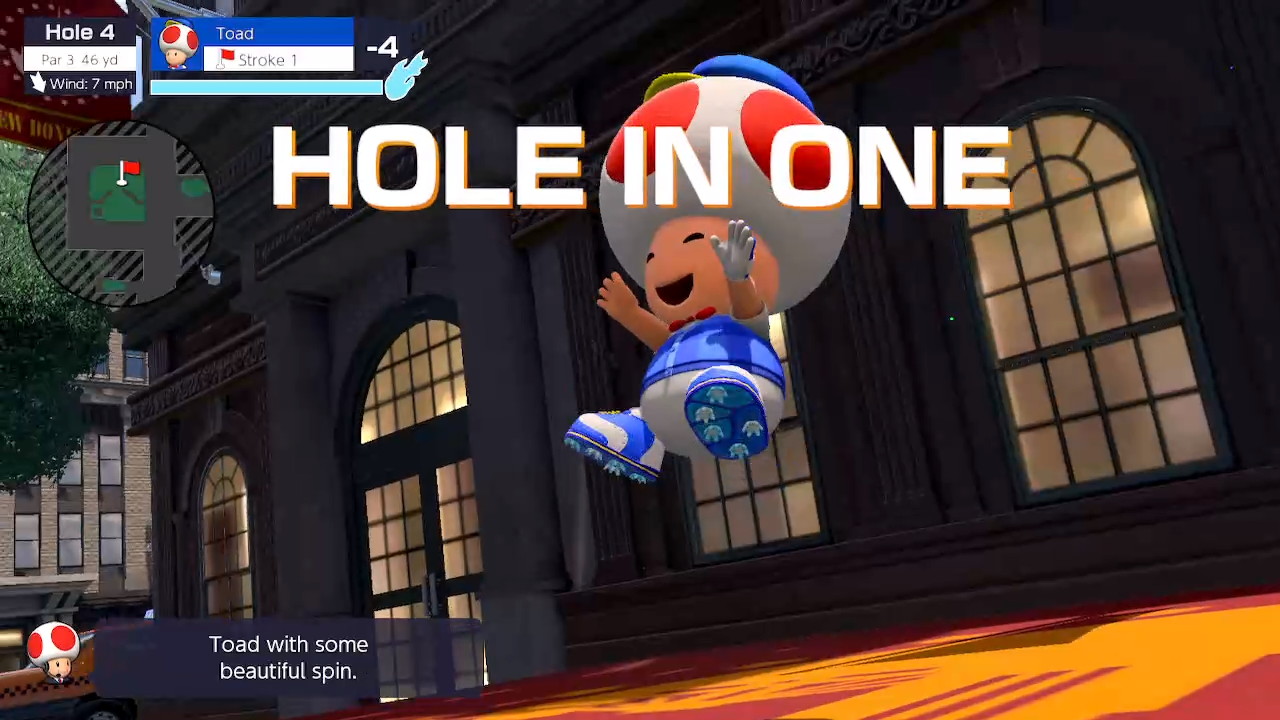
Say you’re about to pull off a major comeback in Super Smash Bros. Or maybe the ‘fit you just put together at the Able Sisters is just begging to be photographed. And, hey! The sun is glinting beautifully off the Eldin Mountains in Hyrule, isn’t it? All perfect times to hit he screen cap button. But you know what? Leaving those great shots to linger in your Switch’s photo album probably doesn’t serve them right. You’re going to want to put them up somewhere else in your digital life: Tweet with them, add them to your social updates, maybe even make a hero edit starring your Villager.

Problem is, Nintendo doesn’t make it easy. And that’s probably by design. Most of Nintendo’s philosophy around online features and social media defaults to keeping kids away from such things, or at least adding friction to the process. Honestly, it’s probably the best for their brand, but that doesn’t mean you aren’t allowed to get all your triumphant moments off the Switch. So, here are two pathways to do so that are somewhat buried in your Switch’s UI: One wireless, the other using a USB cable.


How to Wirelessly Transfer your Switch Photos and Videos to a Smart Device

1. Go to your photo and video album from your Switch’s home screen

2. Select a photo to expand and inspect.

Image Credit: A. Millard via Nintendo

3. Choose “Send to Smartphone”.

4. Your Switch will ask if you want to send the current photo or select a batch.
Note: Choose as many as you’d like, but in my experience, the fewer the better for this type of transfer.

5. Once you’ve selected what you’d like copies of, your switch will prompt you to scan a newly-created QR code.
Note: This QR code may send your phone or tablet to its network settings. This is because the Switch is attempting to make a temporary local network with your device. If so, simply swipe back to your camera app.

6. Once the temporary network is up, your Switch will quickly generate a second QR code to initiate the transfer. Go ahead and scan it. This time, your phone or tablet should go to its default method of downloading files.

7. Save and store the files to your device as you normally would.

The photos and videos you chose are now free to share and copy wherever you want!


How to Transfer Your Switch Photos and Videos Using a Data Cable

But maybe you want to perform a major back up of your Switch photo album. The wireless method is great for single photos, a video, or even a small batch. However, you’ll probably want to use this next method from the Switch’s main menu if you are doing some real Spring cleaning.

1. Go to the “Settings” gear icon from your Switch’s home screen.

2. Choose “Data Management”.

Image Credit: A. Millard via Nintendo

3. Choose “Manage Screenshots and Videos”.

4. Choose “Copy to a Computer via a USB Connection”.

Image Credit: A. Millard via Nintendo

5. Follow the prompt to connect your data transfer cable.
Note: This method assumes a computer is being attached to the other end of the transfer cable, but in my experience, any device that is capable of saving files (and matches your cable’s USB type) should work.

6. Follow the Switch’s prompts for how much of your album you will transfer or back up.

7. Follow your computer or device’s prompts for how and where you will save the incoming Switch photos and videos.

Once the transfer is complete, you can free up space on your Switch, or simply enjoy being able to sort and post your gaming highlights from a more convenient platform.


While Nintendo operating systems don’t tend to be robust, The Big N usually has your back when it comes to letting you keep and organize your gaming data, albeit with a little less user friendliness than you might expect.

Drop by Boss Rush weekly for another dose of advise from our “How-To” series. And if you’re looking for a specific lesson, use the “How-To” tag in our search bar. Or head over to the Boss Rush Discord and suggest a topic you think would be useful.

Featured Image: A. Millard via Nintendo


We Are Boss Rush. Be Better.

,
,

Leave a Reply

Grand Theft Auto VI Netflix Reactions, Xbox Disc-to-Digital, & More - Boss Rush Podcast - A Podcast about Video Games

Support ⁠⁠⁠⁠⁠⁠⁠⁠⁠⁠⁠⁠⁠⁠⁠⁠⁠⁠⁠⁠Boss Rush Network on Patreon⁠⁠⁠⁠⁠⁠⁠⁠⁠⁠⁠⁠⁠⁠⁠⁠⁠⁠⁠⁠⁠⁠⁠⁠⁠⁠⁠⁠⁠⁠⁠⁠⁠⁠⁠⁠.Is Xbox finally finding the right balance between physical game ownership and a digital future? On this episode of the Boss Rush Podcast, ⁠Corey Dirrig⁠ and ⁠LeRon Dawkins discuss Xbox’s new disc-to-digital program, which lets players claim digital licenses for compatible physical games, along with the latest GTA 6 gameplay details and its November 2026 release date. They also break down the biggest Gamescom announcements, including The Witcher 3, Alien: Isolation 2, Fable, Tomb Raider, and Silent Hill Townfall, before diving into Xbox’s Project Helix and its plans for a family of next-generation gaming devices.This and more on the Boss Rush Podcast, part of the Boss Rush Network. Email us your ⁠⁠⁠⁠⁠⁠⁠⁠⁠⁠⁠⁠⁠⁠⁠⁠⁠questions and topic ideas to the podcast here⁠⁠⁠⁠⁠⁠⁠⁠⁠⁠⁠⁠⁠⁠⁠⁠⁠.Join the ⁠⁠⁠⁠⁠⁠⁠⁠⁠⁠⁠⁠⁠⁠⁠⁠⁠⁠⁠⁠⁠⁠⁠⁠⁠⁠⁠⁠⁠⁠⁠⁠Boss Rush Network Community Discord⁠⁠⁠⁠⁠⁠⁠⁠⁠⁠ here⁠⁠⁠⁠⁠⁠⁠⁠⁠⁠⁠⁠⁠⁠⁠⁠⁠⁠⁠⁠⁠.Follow the Boss Rush Network on ⁠⁠⁠⁠⁠⁠⁠⁠⁠⁠⁠⁠⁠⁠⁠⁠⁠⁠⁠⁠⁠⁠⁠⁠⁠⁠⁠⁠⁠⁠⁠⁠⁠X/Twitter⁠⁠⁠⁠⁠⁠⁠⁠⁠⁠⁠⁠⁠⁠⁠⁠⁠⁠⁠⁠⁠⁠⁠⁠⁠⁠⁠⁠⁠⁠⁠⁠⁠, ⁠⁠⁠⁠⁠⁠⁠⁠⁠⁠⁠⁠⁠⁠⁠⁠⁠⁠⁠⁠⁠⁠⁠⁠⁠⁠⁠⁠⁠⁠⁠⁠⁠Bluesky⁠⁠⁠⁠⁠⁠⁠⁠⁠⁠⁠⁠⁠⁠⁠⁠⁠⁠⁠⁠⁠⁠⁠⁠⁠⁠⁠⁠⁠⁠⁠⁠⁠, ⁠⁠⁠⁠⁠⁠⁠⁠⁠⁠⁠⁠⁠⁠⁠⁠⁠⁠⁠⁠⁠⁠⁠⁠⁠⁠⁠⁠⁠⁠⁠⁠⁠Facebook⁠⁠⁠⁠⁠⁠⁠⁠⁠⁠⁠⁠⁠⁠⁠⁠⁠⁠⁠⁠⁠⁠⁠⁠⁠⁠⁠⁠⁠⁠⁠⁠⁠, ⁠⁠⁠⁠⁠⁠⁠⁠⁠⁠⁠⁠⁠⁠⁠⁠⁠⁠⁠⁠⁠⁠⁠⁠⁠⁠⁠⁠⁠⁠⁠⁠⁠LinkedIn⁠⁠⁠⁠⁠⁠⁠⁠⁠⁠⁠⁠⁠⁠⁠⁠⁠⁠⁠⁠⁠⁠⁠⁠⁠⁠⁠⁠⁠⁠⁠⁠⁠, ⁠⁠⁠⁠⁠⁠⁠⁠⁠⁠⁠⁠⁠⁠⁠⁠⁠⁠⁠⁠⁠⁠⁠⁠⁠⁠⁠⁠⁠⁠⁠⁠⁠Threads⁠⁠⁠⁠⁠⁠⁠⁠⁠⁠⁠⁠⁠⁠⁠⁠⁠⁠⁠⁠⁠⁠⁠⁠⁠⁠⁠⁠⁠⁠⁠⁠⁠, and ⁠⁠⁠⁠⁠⁠⁠⁠⁠⁠⁠⁠⁠⁠⁠⁠⁠⁠⁠⁠⁠⁠⁠⁠⁠⁠⁠⁠⁠⁠⁠⁠⁠Instagram⁠⁠⁠⁠⁠⁠⁠⁠⁠⁠⁠⁠⁠⁠⁠⁠⁠⁠⁠⁠⁠⁠⁠⁠⁠⁠⁠⁠⁠⁠⁠.Thanks for your continued support of the Boss Rush Podcast and the Boss Rush Network! If you listen on podcast services, leave us a 5 star rating and a nice review or comment. If you're listening to this episode on YouTube, subscribe to the channel, like the video, leave a comment, and hit the bell so you don't miss an episode posting. ⁠⁠⁠⁠⁠⁠⁠⁠⁠⁠⁠⁠⁠⁠⁠⁠⁠⁠⁠⁠Visit our website for more great content⁠⁠⁠⁠⁠⁠⁠⁠⁠⁠⁠⁠⁠⁠⁠⁠⁠⁠⁠⁠ from Boss Rush and our community.

EXP: Why the GameCube Deserves a Bigger Comeback on Switch 2 - Nintendo Pow Block Podcast - Now Your Podcasting with Power!

Support ⁠⁠Boss Rush Network on Patreon for one week early access to Boss Rush Podcast Plus⁠⁠ Content. The GameCube’s strange, creative spirit could make it Nintendo’s next great revival. On this episode of Expansion Pass, ⁠⁠Edward Varnell⁠⁠ and ⁠⁠Corey Dirrig⁠⁠⁠⁠⁠⁠⁠⁠⁠⁠⁠⁠⁠⁠⁠⁠⁠⁠⁠⁠⁠⁠ look back at its incredible library, from Metroid Prime, Wind Waker, Double Dash, and Smash Bros. Melee to Fire Emblem: Path of Radiance, RPG classics, and the Game Boy Player, and explain why this underappreciated era still resonates with Nintendo fans.This and more on Expansion Pass, part of Boss Rush Podcast Plus on Patreon. Join our Communities:Join the ⁠⁠⁠⁠⁠⁠⁠⁠⁠⁠⁠⁠⁠⁠⁠⁠⁠⁠⁠⁠⁠⁠⁠⁠⁠⁠⁠⁠Boss Rush Network Community Discord⁠⁠⁠⁠⁠⁠⁠⁠⁠⁠⁠⁠⁠⁠⁠⁠⁠⁠⁠⁠⁠⁠⁠⁠⁠⁠⁠. Join the ⁠⁠⁠⁠⁠⁠⁠⁠⁠⁠⁠⁠⁠⁠⁠⁠⁠⁠⁠⁠⁠Boss Rush Network Facebook Group⁠⁠⁠⁠⁠⁠⁠⁠⁠⁠⁠⁠⁠⁠⁠⁠⁠⁠⁠⁠⁠.Follow Nintendo Pow Block on Social Media: Nintendo Pow Block Podcast: ⁠⁠⁠⁠⁠⁠⁠⁠⁠⁠⁠⁠⁠⁠⁠⁠⁠⁠⁠⁠⁠X/Twitter⁠⁠⁠⁠⁠⁠⁠⁠⁠⁠⁠⁠⁠⁠⁠⁠⁠⁠⁠⁠⁠, ⁠⁠⁠⁠⁠⁠⁠⁠⁠⁠⁠⁠⁠⁠⁠⁠⁠⁠⁠⁠⁠Bluesky⁠⁠⁠⁠⁠⁠⁠⁠⁠⁠⁠⁠⁠⁠⁠⁠⁠⁠⁠⁠⁠, ⁠⁠⁠⁠⁠⁠⁠⁠⁠⁠⁠⁠⁠⁠⁠⁠⁠⁠⁠⁠⁠Instagram,⁠⁠⁠⁠⁠⁠⁠⁠⁠⁠⁠⁠⁠⁠⁠⁠⁠⁠⁠⁠⁠ ⁠⁠⁠⁠⁠⁠⁠⁠⁠⁠⁠⁠⁠⁠⁠⁠⁠⁠⁠⁠⁠Threads⁠⁠⁠⁠⁠⁠⁠⁠⁠⁠⁠⁠⁠⁠⁠⁠⁠⁠⁠⁠⁠, ⁠⁠⁠⁠⁠⁠⁠⁠⁠⁠⁠⁠⁠⁠⁠⁠⁠⁠⁠⁠⁠Facebook⁠⁠⁠⁠⁠⁠⁠⁠⁠⁠⁠⁠⁠⁠⁠⁠⁠⁠⁠⁠⁠⁠⁠⁠⁠⁠⁠⁠⁠⁠⁠⁠⁠⁠⁠⁠⁠⁠⁠⁠⁠⁠YouTube⁠⁠⁠⁠⁠⁠⁠⁠⁠⁠⁠⁠⁠⁠⁠⁠⁠⁠⁠⁠⁠, ⁠⁠⁠⁠⁠⁠⁠⁠⁠⁠⁠⁠⁠⁠⁠⁠⁠⁠⁠⁠⁠Twitch.TV⁠⁠⁠⁠⁠⁠⁠⁠⁠⁠⁠⁠⁠⁠⁠⁠⁠⁠⁠⁠⁠Follow the Boss Rush Network: ⁠⁠⁠⁠⁠⁠⁠⁠⁠⁠⁠⁠⁠⁠⁠⁠⁠⁠⁠⁠⁠⁠⁠⁠⁠⁠⁠⁠⁠X/Twitter⁠⁠⁠⁠⁠⁠⁠⁠⁠⁠⁠⁠⁠⁠⁠⁠⁠⁠⁠⁠⁠⁠⁠⁠⁠⁠⁠⁠⁠, ⁠⁠⁠⁠⁠⁠⁠⁠⁠⁠⁠⁠⁠⁠⁠⁠⁠⁠⁠⁠⁠⁠⁠⁠⁠⁠⁠⁠⁠Bluesky⁠⁠⁠⁠⁠⁠⁠⁠⁠⁠⁠⁠⁠⁠⁠⁠⁠⁠⁠⁠⁠⁠⁠⁠⁠⁠⁠⁠⁠, ⁠⁠⁠⁠⁠⁠⁠⁠⁠⁠⁠⁠⁠⁠⁠⁠⁠⁠⁠⁠⁠⁠⁠⁠⁠⁠⁠⁠⁠Instagram⁠⁠⁠⁠⁠⁠⁠⁠⁠⁠⁠⁠⁠⁠⁠⁠⁠⁠⁠⁠⁠⁠⁠⁠⁠⁠⁠⁠, ⁠⁠⁠⁠⁠⁠⁠⁠⁠⁠⁠⁠⁠⁠⁠⁠⁠⁠⁠⁠⁠Threads⁠⁠⁠⁠⁠⁠⁠⁠⁠⁠⁠⁠⁠⁠⁠⁠⁠⁠⁠⁠⁠⁠⁠⁠⁠⁠⁠⁠⁠⁠, ⁠⁠⁠⁠⁠⁠⁠⁠⁠⁠⁠⁠⁠⁠⁠⁠⁠⁠⁠⁠⁠⁠⁠⁠⁠⁠⁠⁠⁠Facebook⁠⁠⁠⁠⁠⁠⁠⁠⁠⁠⁠⁠⁠⁠⁠⁠⁠⁠⁠⁠⁠⁠⁠⁠⁠⁠⁠⁠⁠, ⁠⁠⁠⁠⁠⁠⁠⁠⁠⁠⁠⁠⁠⁠⁠⁠⁠⁠⁠⁠⁠⁠⁠⁠⁠⁠⁠⁠⁠LinkedIn⁠⁠⁠⁠⁠⁠⁠⁠⁠⁠⁠⁠⁠⁠⁠⁠⁠⁠⁠⁠⁠⁠⁠⁠⁠⁠⁠⁠⁠, ⁠⁠⁠⁠⁠⁠⁠⁠⁠⁠⁠⁠⁠⁠⁠⁠⁠⁠⁠⁠⁠⁠⁠⁠⁠⁠⁠⁠⁠⁠⁠⁠⁠⁠⁠⁠⁠⁠⁠⁠⁠⁠⁠⁠⁠⁠⁠⁠⁠⁠⁠⁠⁠⁠⁠⁠⁠⁠⁠⁠⁠⁠⁠⁠⁠⁠⁠YouTube⁠⁠⁠⁠⁠⁠⁠⁠⁠⁠⁠⁠⁠⁠⁠⁠⁠⁠⁠⁠⁠, ⁠⁠⁠⁠⁠⁠⁠⁠⁠⁠⁠⁠⁠⁠⁠⁠⁠⁠⁠⁠⁠Twitch.TV⁠⁠⁠⁠⁠⁠⁠⁠⁠⁠⁠⁠⁠⁠⁠⁠⁠⁠⁠⁠⁠Support Boss Rush Network:Support Boss Rush on ⁠⁠⁠⁠⁠⁠⁠⁠⁠⁠⁠⁠⁠⁠⁠⁠⁠⁠⁠⁠⁠⁠⁠⁠⁠⁠⁠⁠Patreon⁠⁠⁠⁠⁠⁠⁠⁠⁠⁠⁠⁠⁠⁠⁠⁠⁠⁠⁠⁠⁠⁠⁠⁠⁠⁠⁠⁠⁠⁠⁠⁠⁠⁠⁠⁠⁠⁠⁠⁠⁠⁠⁠⁠⁠⁠⁠⁠⁠ and buy merch on our ⁠⁠⁠⁠⁠⁠⁠⁠⁠⁠⁠⁠⁠⁠⁠⁠⁠⁠⁠⁠⁠⁠⁠⁠⁠⁠⁠⁠⁠⁠⁠⁠⁠⁠⁠⁠⁠⁠⁠⁠⁠⁠⁠⁠⁠⁠⁠⁠⁠Store.⁠⁠⁠⁠⁠⁠⁠⁠⁠⁠⁠⁠⁠⁠⁠⁠⁠⁠⁠⁠⁠⁠⁠⁠⁠⁠⁠⁠ Subscribe to ⁠⁠⁠⁠⁠⁠⁠⁠⁠⁠⁠⁠⁠⁠⁠⁠⁠⁠⁠⁠⁠⁠⁠⁠⁠⁠⁠⁠Boss Rush on YouTube⁠⁠⁠⁠⁠⁠⁠⁠⁠⁠⁠⁠⁠⁠⁠⁠⁠⁠⁠⁠⁠⁠⁠⁠⁠⁠⁠⁠ and visit our ⁠⁠⁠⁠⁠⁠⁠⁠⁠⁠⁠⁠⁠⁠⁠⁠⁠⁠⁠⁠⁠⁠⁠⁠⁠⁠⁠⁠website at BossRush.net⁠⁠⁠⁠⁠⁠⁠⁠⁠⁠⁠⁠⁠⁠⁠⁠⁠⁠⁠⁠⁠⁠⁠⁠⁠⁠⁠⁠ for more great content.Thanks for Your Continued Support!Thank you for listening to Expansion Pass, Expansion Pass, part of ⁠Boss Rush Podcast Plus on Patreon⁠. If you’re listening on podcast platforms, leave us a five-star rating and a review. If you’re watching on YouTube, subscribe, like, comment, and hit the bell so you never miss an episode. Thanks for watching and listening!

Xbox Disc-to-Digital Games? Xbox’s Big Push for Game Preservation - Xbox Casuals: An Xbox Podcast

Support Boss Rush on Patreon here.What happens when your physical Xbox games can unlock the flexibility of digital ownership? This week on Xbox Casuals, Corey Dirrig and Josh Finney discuss Xbox’s continued support and approach to game ownership, including the recently announced disc-to-digital program for supported physical game discs providing digital access and benefits. They talk about why game preservation is more than nostalgia, why players want confidence that their libraries will survive future hardware changes, and how Xbox could build stronger loyalty by respecting past purchases. Corey and Josh also discuss the frustration gamers feel when companies and content creators rely on vague updates instead of clear, useful information. Plus, they look at Gamescom, community expectations, and why meaningful player engagement matters more than flashy marketing.This and more on Xbox Casuals: An Xbox Podcast, part of the Boss Rush Network. Join the ⁠⁠⁠⁠⁠⁠⁠⁠⁠⁠⁠⁠⁠⁠⁠⁠⁠⁠⁠⁠⁠⁠⁠⁠⁠⁠⁠⁠⁠⁠⁠⁠Boss Rush Network Community Discord⁠⁠⁠⁠⁠⁠⁠⁠⁠⁠ here⁠⁠⁠⁠⁠⁠⁠⁠⁠⁠⁠⁠⁠⁠⁠⁠⁠⁠⁠⁠⁠.Follow the Boss Rush Network on ⁠⁠⁠⁠⁠⁠⁠⁠⁠⁠⁠⁠⁠⁠⁠⁠⁠⁠⁠⁠⁠⁠⁠⁠⁠⁠⁠⁠⁠⁠⁠⁠⁠X/Twitter⁠⁠⁠⁠⁠⁠⁠⁠⁠⁠⁠⁠⁠⁠⁠⁠⁠⁠⁠⁠⁠⁠⁠⁠⁠⁠⁠⁠⁠⁠⁠⁠⁠, ⁠⁠⁠⁠⁠⁠⁠⁠⁠⁠⁠⁠⁠⁠⁠⁠⁠⁠⁠⁠⁠⁠⁠⁠⁠⁠⁠⁠⁠⁠⁠⁠⁠Bluesky⁠⁠⁠⁠⁠⁠⁠⁠⁠⁠⁠⁠⁠⁠⁠⁠⁠⁠⁠⁠⁠⁠⁠⁠⁠⁠⁠⁠⁠⁠⁠⁠⁠, ⁠⁠⁠⁠⁠⁠⁠⁠⁠⁠⁠⁠⁠⁠⁠⁠⁠⁠⁠⁠⁠⁠⁠⁠⁠⁠⁠⁠⁠⁠⁠⁠⁠Facebook⁠⁠⁠⁠⁠⁠⁠⁠⁠⁠⁠⁠⁠⁠⁠⁠⁠⁠⁠⁠⁠⁠⁠⁠⁠⁠⁠⁠⁠⁠⁠⁠⁠, ⁠⁠⁠⁠⁠⁠⁠⁠⁠⁠⁠⁠⁠⁠⁠⁠⁠⁠⁠⁠⁠⁠⁠⁠⁠⁠⁠⁠⁠⁠⁠⁠⁠LinkedIn⁠⁠⁠⁠⁠⁠⁠⁠⁠⁠⁠⁠⁠⁠⁠⁠⁠⁠⁠⁠⁠⁠⁠⁠⁠⁠⁠⁠⁠⁠⁠⁠⁠, ⁠⁠⁠⁠⁠⁠⁠⁠⁠⁠⁠⁠⁠⁠⁠⁠⁠⁠⁠⁠⁠⁠⁠⁠⁠⁠⁠⁠⁠⁠⁠⁠⁠Threads⁠⁠⁠⁠⁠⁠⁠⁠⁠⁠⁠⁠⁠⁠⁠⁠⁠⁠⁠⁠⁠⁠⁠⁠⁠⁠⁠⁠⁠⁠⁠⁠⁠, and ⁠⁠⁠⁠⁠⁠⁠⁠⁠⁠⁠⁠⁠⁠⁠⁠⁠⁠⁠⁠⁠⁠⁠⁠⁠⁠⁠⁠⁠⁠⁠⁠⁠Instagram⁠⁠⁠⁠⁠⁠⁠⁠⁠⁠⁠⁠⁠⁠⁠⁠⁠⁠⁠⁠⁠⁠⁠⁠⁠⁠⁠⁠⁠⁠⁠.Thank you for your continued support of Xbox Casuals and the Boss Rush Network. If you're listening on podcast services, leave us a five star rating and a review or a comment. If you're watching this video on YouTube, subscribe to the channel, like the video, leave a comment, and hit the bell so you don't miss an episode posting. Your continued listenership and viewership means a lot to us. See you next time on Xbox Casuals!

Discover more from Boss Rush Network

Subscribe now to keep reading and get access to the full archive.

Continue reading